
 EN
EN Español
 Português
 Français
How to register at MiCasino.com: step-by-step guide
Creating an account at MiCasino.com usually takes a few minutes. This guide summarises registration, the details usually requested, identity verification (KYC), first deposit and the points that most delay withdrawals if left until later.
The interface and form fields may change over time. Always use the operator’s official website or link and check current terms on the day you register. This page is guidance and does not replace MiCasino’s published terms.
- Be 18 or older (usual legal requirement).
- Email and phone you can access.
- Real details: they must match your identity document.
- One account per person; duplicate accounts are usually closed.
- Using a RUT or identity card number with typos.
- Leaving KYC until the first large withdrawal.
- Accepting a bonus without reading rollover and eligible games.
- Registering through an unofficial or dubious third-party link.
Requirements to register at MiCasino
In practice, registration requests login and personal details. Players in Chile usually see a field for RUT and a phone number with country code (+56). Other Latin American countries require the equivalent local identity document.
- Minimum age: 18 years.
- Email address that is valid (also check spam).
- Secure password: a minimum length with a letter and number is usually required.
- Username / alias: often letters and numbers only, no spaces.
- Identity document (RUT in Chile or another according to country).
- Mobile phone active for SMS codes in some flows.
- Date of birth matching your document.
- Acceptance of Terms and conditions and privacy policy.
How to register at MiCasino step by step
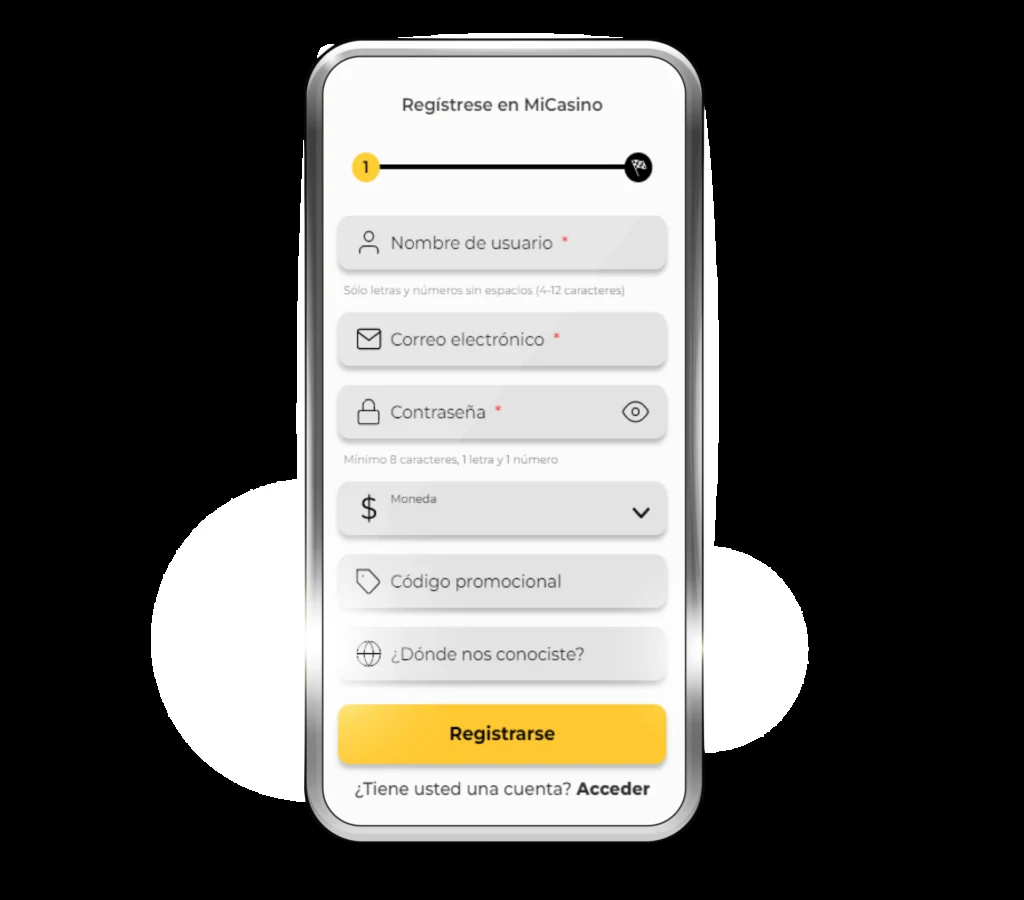
- Visit the official website of MiCasino or your usual registration link. Find the button Register (usually at the top right).
- Create your credentials: username, email and password. If there is a currency field, choose your market’s currency (for example CLP in Chile). Enter a promotional code, if you have one, here or at a later step.
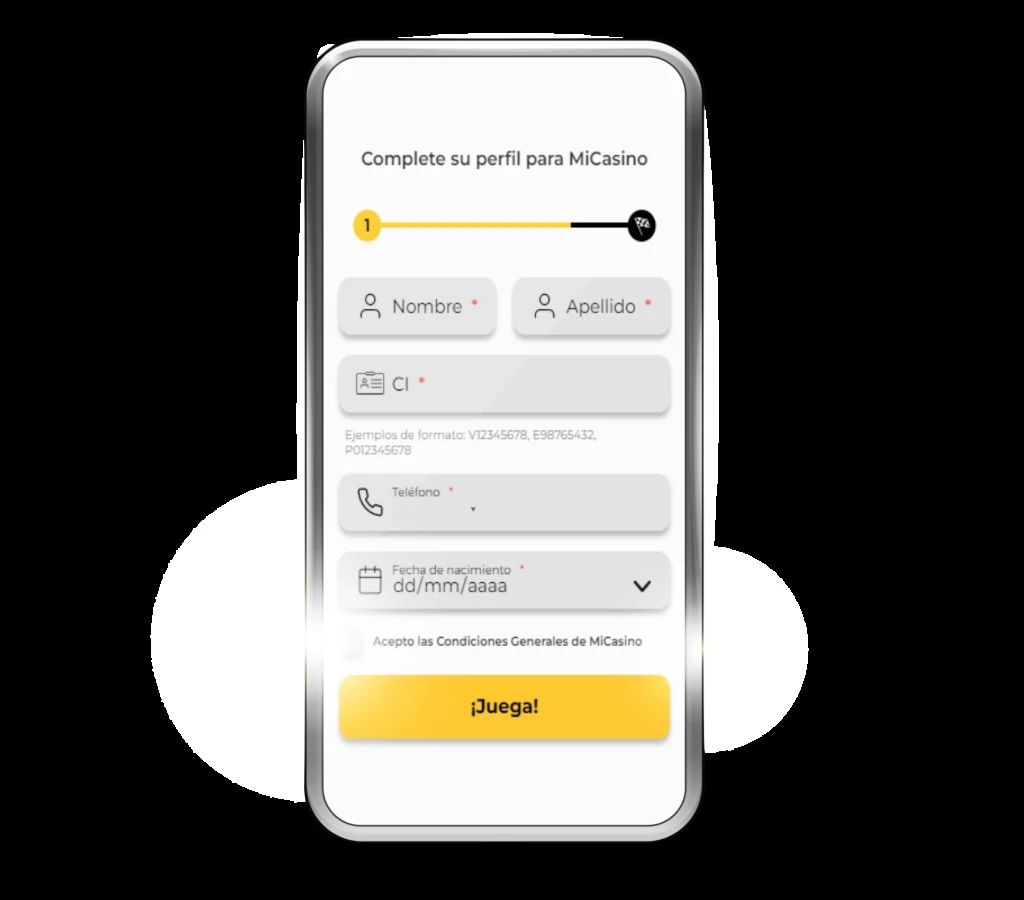
- Complete personal details: first name, surnames, date of birth, identity document (RUT or another) and phone. Use the exact details on your identity card to avoid later verification failures.
- Accept the terms and confirm registration. Some flows send an SMS code or email link to activate the account.
- Log in with the username and password you just created.
- Optional but recommended: upload KYC documents through the user panel as soon as possible, even if you are not withdrawing yet.
- First deposit: choose the method available in your country, amount and, if applicable, activate or reject the welcome bonus as suits you.
Name, birth date and document number must match your official ID. Discrepancies such as an omitted second surname, mistyped RUT or incorrect date commonly cause KYC rejection and delays in the first withdrawal.
Account verification (KYC)
Initial registration allows access and, in many cases, deposits. The identity verification is usually mandatory before withdrawing or above certain amounts. Completing it early prevents blocks when you already have winnings awaiting payout.
Commonly requested documents (may vary):
- Identity document both sides (Chilean identity card, passport or another valid document).
- Selfie holding the document, if requested by the operator.
- Proof of address recent (utility bill or bank statement in your name).
- In some cases, proof of the payment method used.
Upload clear, readable, uncropped files. Common formats are JPG or PDF with moderate file size. Review time depends on request volume; there is no single guaranteed timeline for every case.
Logging in after registration
Once your account is created, use the button Log in / Sign in and enter username (or email) and password. If you forgot your password, use the recovery option linked to your registered email. Do not share credentials or use public devices without logging out afterwards.
First deposit and welcome bonus
After registration, visit the cashier and choose a deposit method available in your country, such as cards, transfers or wallets depending on the market. Minimum amounts and credit times vary by method and current configuration.
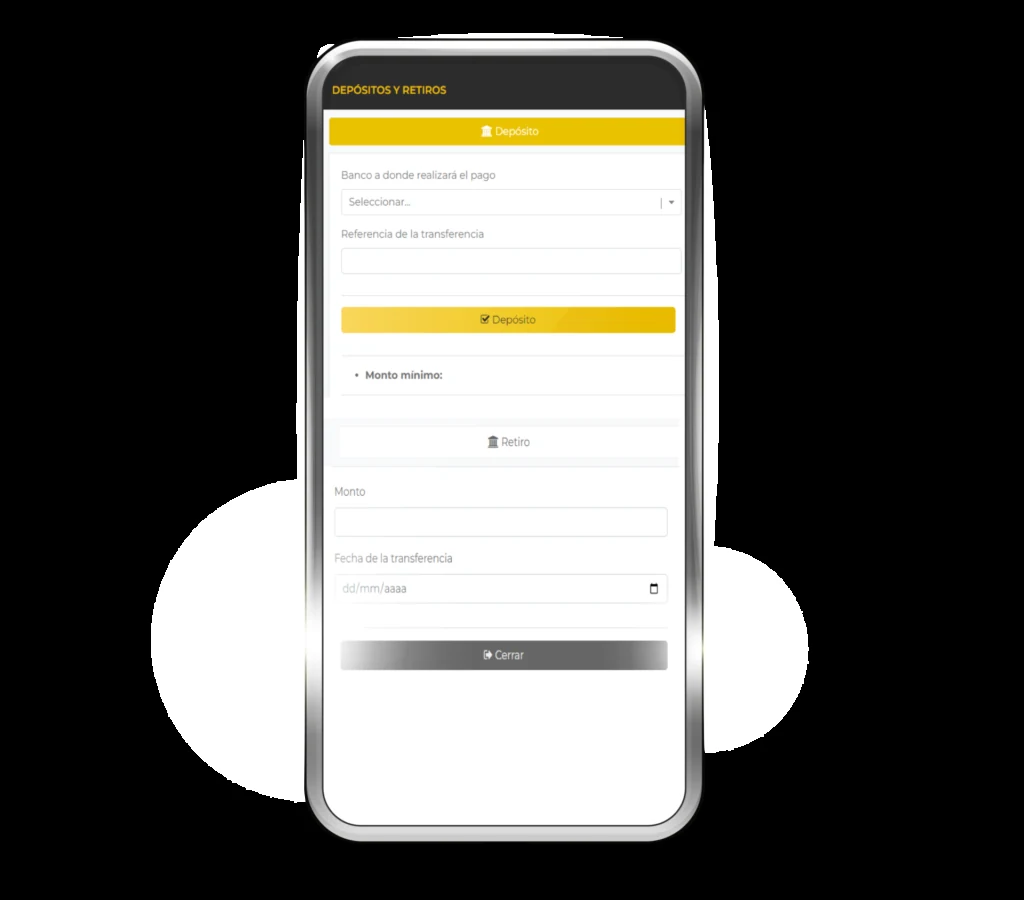
- Decide before depositing whether you want the welcome bonus.
- Read the rollover, contributing games and deadline.
- If you plan to withdraw soon with little wagering, playing without a bonus may be preferable.
- If you accept the bonus, respect its maximum stake limit while active.
Specific bonus figures such as percentages or caps in CLP or other currencies change with campaigns. Always check MiCasino’s published promotion on the deposit date.
Mobile registration
Registration works through your smartphone browser. The flow is the same: Register button, form, confirmation and, if applicable, SMS code or email. Make sure you can access email and phone at that moment. Avoid insecure public Wi-Fi when creating your password and uploading documents.
Common registration problems
- Confirmation email not received: check spam and promotions, wait a few minutes and request resending if available.
- RUT or document rejected: check the verification digit and remove extra spaces.
- Username already taken: choose another alias; usernames usually cannot be changed later.
- Duplicate account: one person, one account. Trying to open several with the same document may lead to closure.
- KYC pending at withdrawal: upload documents early and wait for approval before requesting large amounts.
Security tips
- Register only through official channels or trusted links.
- Use a different password from your email and bank.
- Do not send document photos through informal chats to supposed “support”.
- Enable any available extra account protection.
- Log out on shared devices.
After registration: what you can do
With an active account, you can explore casino, live casino and sports betting according to your country’s offering, deposit, manage responsible gambling limits where available and contact support. For withdrawals, remember KYC, active bonus terms and the selected payment method’s timelines.
18+. Gambling can be addictive. Gamble responsibly. Registration steps, documents and promotions may change; always verify information on MiCasino’s official website before creating an account or depositing.
Frequently asked questions about MiCasino registration
How long does MiCasino registration take?
The form usually takes a few minutes with email, phone and identity details ready. Subsequent KYC may take longer depending on review workload and the quality of uploaded files.
What is the minimum age to create an account?
You must be over 18. Your age is declared during registration and confirmed with your identity document during KYC.
Do I need a RUT to register from Chile?
Registration processes aimed at Chile usually request a RUT or another valid identifier. Enter it exactly as it appears on your identity card to avoid verification rejections.
Can I have more than one account?
No. Platforms of this kind normally allow one account per person. Multiple accounts linked to the same identity may be closed and balances withheld under the terms.
Is identity verification mandatory at registration?
Basic registration often allows you to log in and deposit. Full verification (KYC) is usually required to withdraw or above certain amounts. It is advisable to complete it early.
Which documents does KYC require?
Usually both sides of your identity document, sometimes a selfie with the document and recent proof of address. The exact list is shown in your account dashboard.
Can I register on my phone?
Yes. The form is designed for a mobile browser. Have access to your email and SMS on the same device or another one nearby.
Where do I enter the promotional code?
If the form includes a promotional code field, enter it during registration or at the step specified by the promotion. If there is no field, follow the instructions for the current offer on the website.
Is registration free?
Creating an account does not involve a mandatory payment. You would only spend money on a later deposit if you decide to play with a real balance.
What should I do if the activation email does not arrive?
Check spam and promotions, confirm that you entered your email correctly and wait a few minutes. If the website allows you to resend the link or code, use that option. As a last resort, contact official support through the website itself.
Can I change my username later?
On many forms, the alias cannot be changed once the account is created. Choose one you will feel comfortable with in the long term.
What happens if my details do not match my document?
Verification may be rejected and withdrawals delayed until the information is corrected. Contact support with clear documentation; do not open a second account to “fix” it.